
Sched
Sched LLCEvents
4.0290.00 Reviews
- Version
- 1.63.0
- Installs
- 100.00K
- Age Rating
- Everyone
Screenshots
Our Review of Sched
 Analysis by Appyee
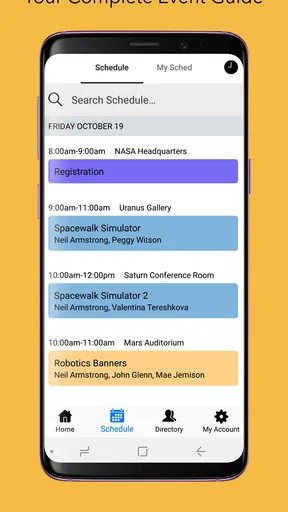
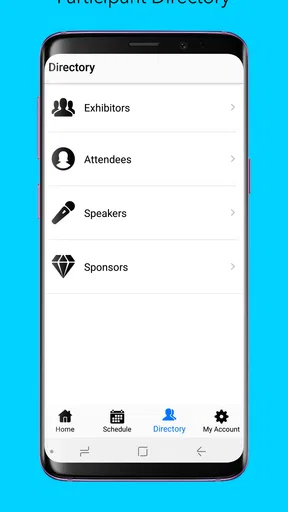
When I use Sched for an event, I treat it less like a general social app and more like a focused digital program. It is built for Sched events, with the main job of helping me view the schedule without carrying a printed timetable or repeatedly searching through a browser page. That narrow purpose is also its biggest strength: when the event has been configured well, I can spend less time finding information and more time deciding where to go next.
The app is free, made by Sched LLC, and listed for Everyone. It belongs in the events category rather than the broader productivity or communication space, so I would not install it expecting a universal calendar, a ticket wallet, or a replacement for messaging apps. I see it as an event companion whose usefulness depends heavily on whether the particular conference, festival, class series, or gathering I am attending uses Sched effectively.
My overall impression is positive, but practical rather than enthusiastic. The app has an average rating of 4.1 from around 1.7 thousand ratings, and that feels consistent with the experience: it can make a busy event easier to navigate, yet it cannot solve incomplete event information, a poor connection, or changes that have not been reflected by organizers. The important question is not simply whether Sched works in isolation. It is whether it fits the way a specific event publishes and updates its program.
Where the experience usually gets stuck
I find that the most useful way to understand this section is to separate a slow or confusing moment from a genuine failure. I look first at whether the selected event and its published program make sense, then consider connection and timing; that order keeps me from blaming the app for a schedule that is incomplete or still changing. Next, I turn to a few checks that are easiest to do before the day gets busy.
Finding the right event is the first real test
The first point where I would expect friction is before schedule browsing even begins. An event may have a distinctive name, a short name, or several editions, and choosing the wrong listing can make the app appear empty or irrelevant. I would check the event name carefully and confirm that the schedule belongs to the current gathering rather than an older edition or a similarly named event.
This is an important difference from a normal calendar app. In a personal calendar, I create or import the information myself. With Sched, the event organizer controls the structure and content that I am trying to view. If a session is missing, a room label looks unusual, or a time seems different from a poster, the issue may originate in the event’s schedule rather than in the application on my phone.
I also avoid judging the app after opening it for the first time in a crowded venue. A conference hall full of attendees can mean weak mobile service, and a festival site can have patchy coverage between locations. If the schedule takes a moment to appear, I first give the app a chance to load rather than repeatedly tapping buttons. Repeatedly restarting during a poor connection can make a simple delay feel like a larger failure.
Why an apparently empty schedule may be misleading
An empty-looking screen does not always mean there are no sessions. It may mean that the selected event is not the one I intended, the schedule has not finished loading, or the organizer has not published the relevant content yet. I would move through the basic checks in order: verify the event, confirm the connection, close and reopen the app once, and then compare what I see with the event’s official communication.
That last comparison matters. Sched is useful for presenting an event program, but it is not necessarily the only channel an organizer uses. A venue notice, registration message, or official event page may contain a last-minute instruction that is not visible in the schedule view I am using. I therefore keep the app as my main timetable, while treating official announcements as the authority for urgent changes.
Schedule browsing is not the same as event planning
When I first open a large program, I resist trying to read everything at once. A better approach is to identify the sessions that matter most, note their times and locations, and then look for gaps between them. This prevents a common mistake: choosing several attractive sessions that are impossible to attend because they overlap or are in distant parts of the venue.
My practical habit is to plan around fixed commitments first. If I must meet someone, attend a workshop, or reach a particular room, I place that item mentally at the center of the day. I then use the schedule to fill the spaces around it. This makes Sched more useful than a simple alphabetical list because I am using it as a live decision aid rather than merely reading a catalog of sessions.
Setup checks that prevent avoidable trouble
Before relying on Sched in a crowded venue, I make sure I can identify the event I intend to attend and that its program is visible on my device. I also check the phone’s operating-system compatibility and leave myself enough battery for repeated schedule checks. These small preparations matter because they are much easier to handle at home than between sessions, and they lead naturally to what I do if the plan still falters.
Start before arriving at the venue
I recommend opening the app before the event begins, ideally while I still have a reliable connection. I check that the event appears, that the program is readable, and that the times look sensible for the location. This small preparation step is more valuable than troubleshooting for the first time while standing in a queue or trying to choose between two sessions that are about to start.
Sched was released on May 3, 2018, and the current version listed for it is 1.62.3. It supports devices running Android 8.0 or later. For me, the useful lesson is simple: I check compatibility before relying on it for a full day. If the phone is older, the operating system is below the requirement, or the app has been installed for a long time without updating, I do not wait until the morning of the event to discover a problem.
I also make sure the phone has enough battery for the day. That sounds obvious, but an event schedule app may be consulted repeatedly between rooms, during breaks, and when plans change. I lower unnecessary battery use, carry a charger or power bank if the day is long, and avoid assuming that venue charging points will be convenient.
Give the event a sensible starting point
Once the correct event is open, I begin with the broad program rather than immediately searching for one speaker or session. I want to understand how the day is arranged: whether there are parallel tracks, repeated sessions, or long gaps. This gives me context when I later search for something specific and reduces the chance of overlooking a better option in another part of the program.
A useful workflow is to identify three types of items: the sessions I definitely want, the sessions I would attend if nearby, and the sessions I can use as backups. The first group protects the purpose of my visit. The second keeps the day flexible. The third matters when a room is full, a session changes, or I arrive late. This is a more resilient plan than building a timetable with no alternatives.
Do not confuse the app with registration or access control
One question many users have is whether a schedule app automatically handles every part of event attendance. I would not assume that. Sched’s stated role is to let me view the event schedule. Registration, admission, identification, payments, venue rules, and organizer messages may still be handled elsewhere. I check my confirmation details separately and keep any required entry information available in the format the organizer requested.
That separation also helps when something appears wrong. If the schedule is visible but I cannot enter a room, that is probably an access or capacity matter rather than a schedule-display problem. If I have not received a registration confirmation, installing Sched will not replace that missing step. Understanding this boundary prevents me from asking the app to perform a job it was not designed to perform.
Recovering the workflow when something goes wrong
When something goes wrong, I try to preserve the information I still need instead of making several changes at once. I check the connection, reopen the app once, and compare the displayed program with the event’s current official communication; for essential sessions, a brief note with times and rooms is a practical fallback. That approach also helps distinguish a temporary workflow problem from an issue that belongs to the event itself.
A calm sequence for loading problems
If the program does not load, I use a short recovery sequence instead of changing several things at once. First, I check whether other apps can reach the internet. Next, I retry the event once. Then I close and reopen Sched. If the phone is connected to an overloaded public network, I try a different connection when practical. These are ordinary checks, but they isolate whether the issue is the app, the network, or the event source.
I avoid deleting the app as an early reaction. Reinstalling can remove local convenience and does not repair an organizer-side problem or a weak connection. It also takes time when I may simply need to know where the next session is. I would reserve a reinstall for a persistent installation problem after simpler steps have failed and after I have confirmed that the event information is available through the organizer’s other channels.
Handling changes without losing the day
Event schedules are naturally changeable. A speaker may be delayed, a room may be reassigned, or a session may be canceled. When I notice a discrepancy, I compare the app with the newest official notice rather than trusting whichever source I opened first. If the app still shows the older arrangement, I make a temporary note for myself and follow the current instruction from the event team.
This is one of the most important trade-offs. A dedicated schedule app is easier to scan than a long email thread, but it is only as current as the information connected to it. I value the structured view, especially when many sessions run at once, yet I do not treat it as an independent guarantee that every last-minute change has already appeared.
Use a backup that matches the risk
For a small local event, remembering the next session may be enough. For a full-day conference with overlapping tracks, I prepare a backup. I might write down the two or three sessions that are essential, including their times and rooms, before leaving a dependable connection. I do not need to reproduce the entire program. A short fallback note protects me if the phone battery drops, the venue network becomes unusable, or the app needs attention at the wrong moment.
This is not a criticism unique to Sched; it is a sensible habit for any phone-based event tool. The difference is that Sched encourages me to rely on a centralized schedule, so I make sure I know how to continue when that central view is temporarily unavailable. A backup is especially useful for travel, outdoor venues, and events with large crowds.
When the app is not the cause
I judge the app separately from the event’s information and the conditions around it. If other attendees see the same outdated schedule, I would ask event staff about the program; if the problem appears only on my phone, I would check the device and connection first. That distinction saves time, and it helps explain why the next part focuses on who is likely to get real value from this particular tool.
Organizer quality shapes the result
The app can present a schedule, but it cannot improve the quality of the schedule itself. If descriptions are vague, room names are inconsistent, or times are entered incorrectly, I may still have a confusing day even when the interface loads perfectly. I judge the tool and the event setup separately. A clean display is valuable, but it does not compensate for incomplete planning by the organizer.
This also explains why two people can have very different opinions about the same app. At a well-organized event, Sched may feel like the central guide for the entire day. At an event with sparse information or frequent changes, it may feel limited. The difference may come less from the software and more from how carefully the program has been maintained.
Network, device, and timing issues can look identical
A slow screen, missing content, or failed refresh can be caused by several unrelated conditions. The phone may have weak service, the venue Wi-Fi may be congested, the device may be running low on resources, or the event information may be changing at the source. I find it useful to test one variable at a time and to ask whether another person can see the same schedule.
If several attendees see the same outdated information, I would speak with event staff rather than repeatedly troubleshooting my phone. If only my device is affected, I would check compatibility, connection, and the app installation. This simple distinction saves time and directs the question to the person most able to fix it.
Who benefits most from this focused approach?
I think Sched is particularly suitable for people attending programs with multiple simultaneous sessions. It is also helpful for anyone who dislikes carrying paper schedules or scrolling through a long mobile webpage. Students, conference visitors, festival attendees, and professional event participants can all benefit when the event’s timetable is the main information they need.
I am less likely to recommend it as a standalone solution to someone who wants a personal task manager, a universal calendar, or a communication hub for a group of friends. A general calendar may be better when I need reminders across many unrelated appointments. A browser page may be enough for a tiny event with only a few items. A messaging channel may be more useful for informal coordination. Sched makes the most sense when the event itself is organized around a schedule that I need to browse repeatedly.
My practical verdict after using it as an event companion
Sched is free to use and has passed the basic popularity test, with over one hundred thousand installs and around 288 written reviews. I see those figures as signs that it has a real audience, but not as a reason to ignore the practical details. The better question is whether my event uses Sched as an actively maintained program rather than merely listing it as an optional download.
My recommendation is to install it before arrival, verify the correct event, inspect the schedule while the connection is reliable, and prepare a small backup for the sessions that matter most. I would also keep registration and access information separate, because viewing a timetable is not the same as proving admission or receiving every organizer announcement.
The app’s main advantage is focus. Instead of forcing me to reconstruct an event from scattered pages, messages, and printed notices, it gives me a dedicated place to consult the program. Its main limitation is equally clear: it depends on the quality and freshness of the event information, and it cannot remove real-world problems such as crowded networks, room changes, or an outdated announcement.
For me, that makes Sched a useful, sensible choice when an event is built around a substantial schedule. I would recommend it to a friend going to a multi-session gathering, with one condition: use it as the primary timetable, not as the only source of truth. With that expectation, and with a few setup checks completed in advance, the app can turn a confusing event program into a manageable plan without pretending to be more than an event schedule tool.
Privacy and Permissions
See what permissions an app requests and how it handles your data.
- Photos/Media/Files
- read the contents of your USB storage, modify or delete the contents of your USB storage
- Storage
- read the contents of your USB storage, modify or delete the contents of your USB storage
- Camera
- take pictures and videos
- Microphone
- record audio
- Other
- view network connections, full network access, control Near Field Communication, run at startup, prevent device from sleeping
Verdict
Strengths of Sched
- Simple scheduling interface for quickly creating and organizing events.
- Useful reminders help reduce the chance of missing important appointments.
- Calendar views make upcoming commitments easy to review at a glance.
- Supports recurring events for routines, classes, and regular meetings.
- Clean design is approachable for users who prefer minimal calendar tools.
Limitations of Sched
- Advanced collaboration features may be limited compared with larger calendar platforms.
- Some useful options may require extra setup before they work as expected.
- Notifications can be easy to overlook if system permissions are restricted.
- The app may feel too basic for users needing detailed task management.
- Compatibility with external calendars may vary by device and account setup.
Similar Picks in This Category
View All
Easy Quran Mp3 Audio Offline
Muslim Worldapp4.7

Invitation Maker: Cards & RSVP
Greetings Island4.9

StubHub - Live Event Tickets
StubHub4.3

Fever: Events & Tickets
Fever Labs4.7

Epic Freebie Games Radar
Arioch Pds - Apps & Games4.4

Invitation card Maker, Design
Splendid App Maker4.9
Frequently Asked Questions
What is Sched, and what can I use it for?
Sched is an event-planning and scheduling app designed to help users organize conference programs, meetings, classes, festivals, and other multi-session events. After selecting an event, you can usually browse the complete agenda, view session details, check locations, and create a personal schedule. It is particularly useful when an event has many activities happening at the same time.
Do I need an account to use Sched?
You can often browse an event’s public schedule without creating an account, which is convenient if you only want to check times, speakers, or locations. However, signing in may be necessary to save sessions, synchronize your personal agenda, receive updates, or interact with other event features. Account requirements can vary depending on how each event organizer configures its Sched page.
Can Sched work without an internet connection?
Sched may allow you to access some previously loaded event information when your connection is limited, but you should not assume that every feature will work offline. Updates, newly added sessions, announcements, networking tools, and synchronized schedule changes generally require internet access. For reliable use, open the event schedule while connected before arriving at the venue.
Can I create and manage a personal event schedule in Sched?
Yes, one of Sched’s most useful features is the ability to build a personalized agenda. You can select sessions, talks, workshops, or activities you want to attend and review them in a separate schedule. This makes it easier to identify overlapping events and plan your day. Availability may depend on the event organizer and the specific app version.
Is Sched free to download and safe to use?
Sched is generally available as a free app for attendees, although individual events may provide access through their own registration systems or require credentials. As with any event platform, the app may process information such as your account details, selected sessions, or optional profile data. Before downloading, review the store listing, privacy policy, permissions, and the organizer’s terms.
